HubSpot Post-Meeting Automation: 5 Brilliant Ways to Close Deals Faster
In the world of high-stakes sales, the meeting isn’t where the deal is won—it’s the follow-up. We’ve all been there: a fantastic discovery call ends, you’re feeling’ inspired, and then… life happens. Your next call starts, an inbox fire breaks out, and that “thank you” email stays in your drafts for three days. By the time you hit send, the lead has cooled off.
Using HubSpot post-meeting automation isn’t just about saving five minutes of typing; it’s about killing the “silent period” that haunts every sales pipeline. It’s the difference between a prospect feeling valued and a prospect feeling forgotten.

Mr.Sceptic
— Wait, won’t my clients feel like they’re talking to a robot? I thought ‘personal touch’ was the whole point of sales.
The Reality Check: There’s nothing personal about forgetting to send a resource you promised. Automation handles the “what” and “when,” so you can focus on the “how.” It keeps the momentum alive while you’re actually doing the human work.
1. Stop the "Booking Chaos" with Smart Confirmations
The chaos starts before the meeting even begins. Without a solid confirmation, you’re stuck wondering if they’ll actually show up. Most people use the default HubSpot settings, but you can do better.
In the Meetings Scheduler, you can toggle on “Confirmation emails.” But here is the pro tip: don’t just confirm. Use this space to set the stage. If you have a Standard Operating Procedure for your sales team, ensure your meeting link includes a brief agenda in the description.
Go to: Sales > Meetings.
Action: Edit your scheduling page.
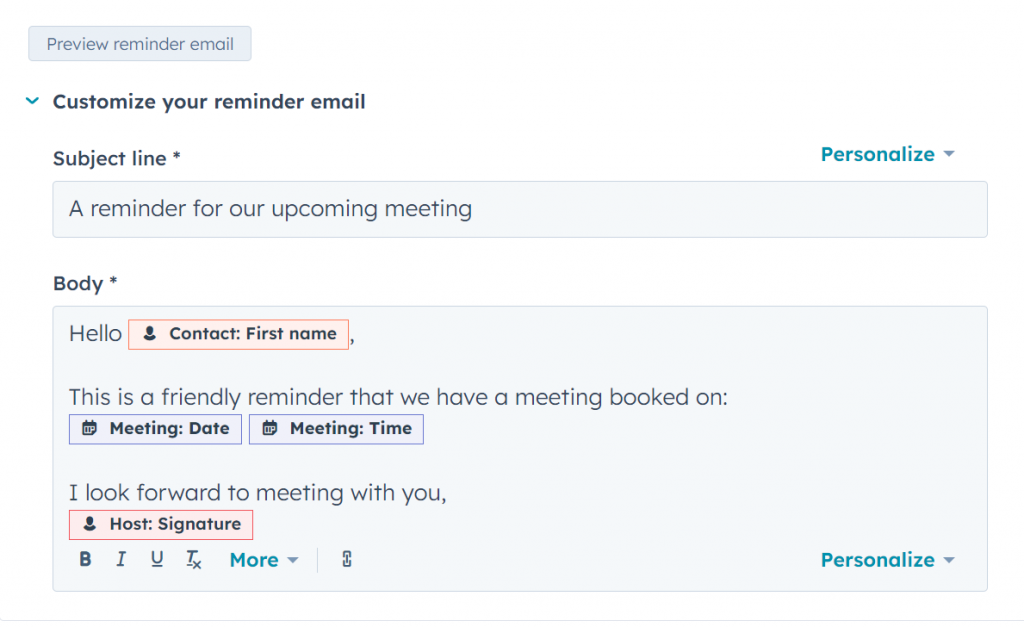
The Flow: Switch on “Pre-meeting reminders” to slash your no-show rates by up to 30%.
2. Triggering the "Thank You" via Workflows
HubSpot’s built-in scheduler handles the “before,” but for the “after,” we need the heavy machinery: Workflows. This is where you transition from a basic user to a SaaS power player.
Instead of manually typing “Great chatting today,” you set a trigger. The best trigger isn’t just “Meeting Booked”—it’s the Meeting Outcome.
How to Build the “Post-Call Pulse” Workflow:
Set the Trigger: Set “Meeting outcome is any of Completed.”
Add a Delay: Don’t send it 1 second after the call; that feels robotic. Add a 30-minute delay to make it feel like you just stepped away from your desk and sat down to write it.
Send the Email: Use a marketing email template saved for automation.
Mr.Sceptic
— What if the meeting went poorly and I don’t want to send a ‘thank you’? Does the machine just fire anyway?
Fair point. That’s why we use the Meeting Outcome property. If you mark it as “Qualified” or “Completed” in the CRM, the email fires. If it was a disaster, you mark it differently, and the automation stays silent. You stay in control.
3. Ending the "Resource Hunting" Nightmare
How many times have you said, “I’ll send over that case study,” and then spent 20 minutes looking for the PDF?
With HubSpot post-meeting automation, you can build specific workflows for different meeting types. If someone books a “Demo Call,” your automated follow-up can automatically include links to your pricing page and a high-authority Gartner Research report to build instant credibility.
The Result: Your prospect gets the info while their pain points are still top-of-mind.
The Vibe: You look like the most organized person they’ve ever met.
4. The "No-Show" Recovery Sequence
Life happens. People miss meetings. The chaos occurs when you have to manually chase them down to reschedule.
Stop chasing. Create a branch in your workflow. If the Meeting Outcome is “No-show,” trigger a sequence that says: “Hey, sorry we couldn’t connect! Here is my link again—pick a time that works better for you.”
This moves the burden of scheduling back to the prospect without you losing a single second of productivity. You aren’t “checking in”; you are providing a solution to a scheduling conflict.
5. Leveraging AI for Contextual Follow-ups
If you’re on a Sales Hub Professional plan, you shouldn’t just be sending static text. HubSpot AI now allows you to summarize meeting notes and pull them into your CRM records.
While full automation is great for general thank-yous, use Sequences for high-ticket deals. A sequence allows you to start with an automated “Thank You” but pauses the next steps once the prospect replies. It’s the perfect blend of “set it and forget it” and “human intervention.”
Mr.Sceptic
— Sounds like I’ll be spending all my time setting up workflows instead of selling.
It feels that way for exactly one hour. Then, you never have to think about a “thank you” email again for the rest of the year. Do the math.
Final Thoughts: Technology as Your Invisible Assistant
The goal of HubSpot post-meeting automation isn’t to replace the salesperson. It’s to remove the friction that prevents sales from happening. When you automate the repetitive, you unlock the energy to be creative, empathetic, and strategic during the actual call.
Stop living in your “Sent” folder. Let the platform handle the “Hop” so you can stay in the flow.