How to Check Referring Domains: A Strategic Guide to Backlink Intelligence
In the competitive landscape of digital marketing, knowing how to check referring domains is the foundation of modern SEO success. Many beginners make the mistake of focusing solely on total backlink counts, but smart marketers look at unique referring websites to gauge true authority.
A referring domain is a unique website that points at least one link toward your site. While one site might give you a hundred links, it still counts as only one referring domain in terms of diverse digital endorsements. This distinction is vital for understanding your site’s actual standing in Google’s eyes.
This data tells you who truly trusts your content and recognizes your brand as a leader. It also reveals the hidden strategies of your most successful competitors, allowing you to replicate their wins.
Understanding the Power of Digital Endorsements
Before diving into the “how,” we must understand the “why.” Search engines treat referring domains like votes of confidence in a global election.
If a high-authority news site links to you, it carries more weight than ten obscure blogs. This is why the process of checking these domains requires a critical eye and the right set of tools.
Step 1: Accessing the Engine Room
To begin, you need a powerful tool like Ahrefs to analyze the digital landscape effectively. Ahrefs maintains one of the world’s largest indexes of live backlinks, making it the industry standard.
Simply paste your URL into the Site Explorer bar to see the initial results. This tool acts as a bridge between raw, confusing data and actionable marketing decisions that drive growth.
For those looking to understand the technical side of how Google perceives these connections, exploring the official Google Search Central documentation is an excellent way to ground your knowledge in search engine fundamentals.
Step 2: Navigating the Referring Domains Report
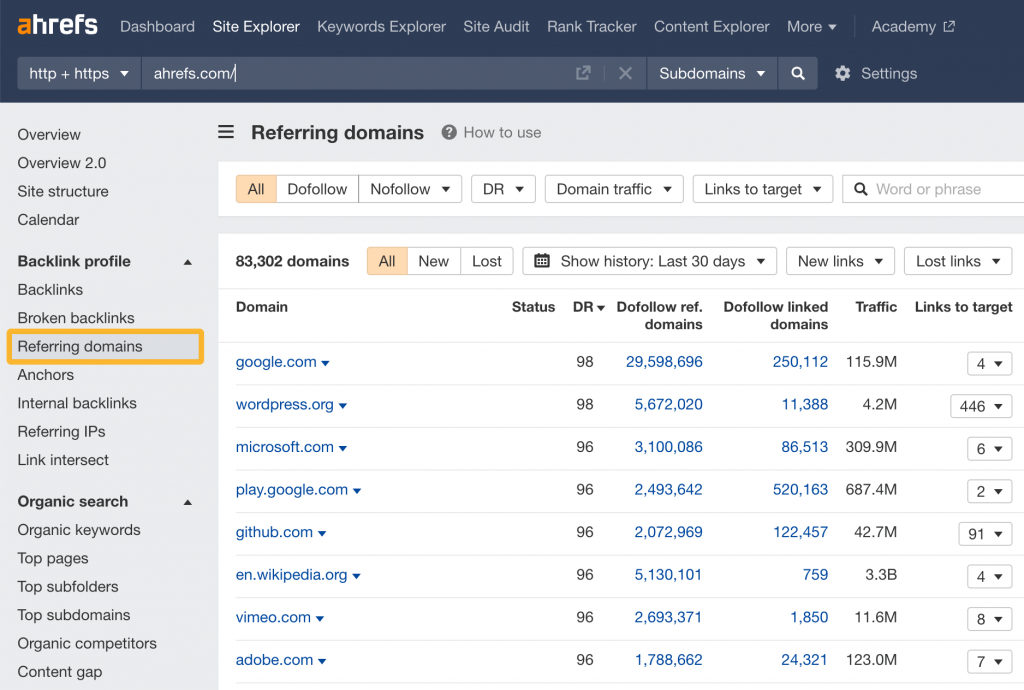
Once your site data is loaded, look at the sidebar menu on the left. Click on the section labeled “Referring domains” to open the full list of unique linking websites.
This report is your primary map for how to check referring domains with precision. It organizes information so you can see exactly which organizations are talking about you.
Each entry in this list represents a unique relationship. By analyzing this list, you can see if your growth is coming from organic mentions or coordinated marketing efforts.
Step 3: Filtering for High-Quality Data
Not every link is a beneficial link; in fact, some can even be harmful. You must use Ahrefs’ powerful filters to find the data points that actually move your rankings.
Live vs. Lost: Focus on “Live” links to see your current SEO power. Lost links can tell you where you are bleeding authority.
Domain Rating (DR): Target domains with a high DR to gain more authority. A link from a DR 80 site is a “power link.”
Link Type: Prioritize “DoFollow” links for maximum ranking impact, as these pass the actual SEO value.
By refining your view, you move from looking at a mountain of data to looking at a list of opportunities. This is the secret to efficient link-building audits.
Step 4: Analyzing Volatility and Growth Trends
When you study how to check referring domains, always look at the “Over Time” graph. This visual representation of your growth tells a story that numbers alone cannot.
Steady, incremental growth is the hallmark of a healthy, natural link profile. It suggests that your content is being discovered and shared naturally by others in your industry.
However, sudden spikes often indicate paid link packages or aggressive PBN (Private Blog Network) usage. While these might offer a temporary boost, they carry significant risks of manual penalties from Google.
Step 5: Auditing Competitor Strategies
The best way to grow your own site is to see what is already working for others. By learning how to check referring domains of your rivals, you can reverse-engineer their success.
Check their “New” domains weekly to see who has recently started linking to them. This provides you with a pre-vetted list of websites that are currently active in your niche and open to linking out.
If a high-authority blog links to a competitor, it is a clear sign that they find that specific topic valuable. You can then create a better version of that content and reach out to the same domain.
Step 6: The Importance of Anchor Text Context
While the domain itself matters, the words used to link to you—known as anchor text—are equally important. In the referring domains report, you can expand each domain to see the specific anchor text.
Are people linking to you using your brand name, or are they using keywords you want to rank for? A healthy profile has a mix of both, appearing natural to search algorithms.
If 100% of your referring domains use the exact same keyword as anchor text, it looks suspicious. Diversity in anchor text is a key signal of a legitimate, high-quality website.
Step 7: Exporting for Deep Analysis
Sometimes, the web interface is not enough for a comprehensive site audit. Export your data to a CSV or Excel file to perform custom sorting, filtering, and cross-referencing.
This allows you to integrate your SEO data with other internal projects or client reports. It also gives you a “snapshot” of your profile that you can compare against future data.
If you are also working on other technical setups, you might find our guide on WordPress Hosting Configuration helpful. Ensuring your site is technically sound is necessary before you start driving authority through links.
Step 8: Identifying and Cleaning Toxic Links
Not all referring domains are friends. Sometimes, “negative SEO” or old spammy tactics can leave you with domains that drag your rankings down.
Look for domains with suspicious names, non-relevant niches, or extremely low DR scores. If these make up a large portion of your profile, you may need to use the Google Disavow tool.
Cleaning your profile is just as important as building it. A clean, lean profile of 100 high-quality domains will almost always outperform a messy profile of 1,000 low-quality ones.
Conclusion
Mastering how to check referring domains gives you a massive advantage in the SEO game. It turns blind guesswork into a precise, data-driven strategy that yields long-term results.
By understanding who links to you and why, you can better position your brand as an authority. Keep your profile clean, monitor your competitors relentlessly, and always prioritize the quality of a domain over the quantity of links.
SEO is not just about being found; it is about being recognized by the right people. Use these steps to ensure your website is the most respected name in your digital neighborhood.