What is Opus Clip? Can AI Really Pick “Viral” Moments?
In today’s fast-paced digital landscape, content creation isn’t just about “making stuff”—it’s about staying ahead of a shrinking attention span. If you have spent hours producing a deep-dive podcast or a long-form YouTube tutorial, you know that every second is valuable. However, the reality is that most viewers won’t sit through a 40-minute video on their first encounter with you. This is where Opus Clip changes the game.
In this guide, we will break down how you can transform your long-form footage into viral Shorts, Reels, or TikToks with a single click. And to keep things grounded, our resident AI-cynic, Mr. Sceptic, will be joining us to ask the tough questions.
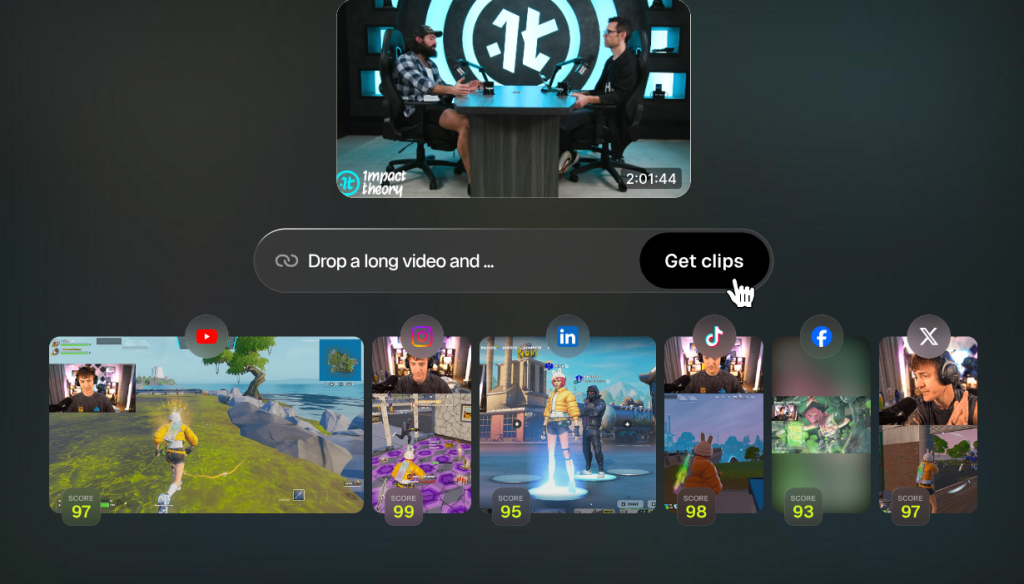
What is Opus Clip? Can AI Really Pick “Viral” Moments?
Opus Clip is an AI-powered platform designed to analyze long videos and automatically extract the most engaging segments for social media. It doesn’t just blindly cut video; it uses natural language processing (NLP) to detect topic changes, emotional shifts, and “hooks”—those crucial lines that stop someone from scrolling.

Mr.Sceptic
— Hold on a minute. How is a machine supposed to know which part of my video is actually funny or insightful? Isn’t it just picking random segments?
The Reality: Actually, Mr. Sceptic, the AI compares your content against successful short-form patterns. It looks for clarity, emotional impact, and visual interest to assign a “virality score” to each clip, predicting how well it might perform based on data, not just guesswork.
Step-by-Step: Turning One Video into 10+ Shorts
Let’s get into the mechanics of how this works. It’s designed to be intuitive, even if you have zero editing experience.
1. Account Setup and Credits
First, head over to Opus.pro and sign up with your Google account or email. New users typically start with a free trial that provides around 60 to 72 “credits” or minutes of video processing.
2. Paste Your Link or Upload
You don’t even need to download your video first. Opus Clip supports direct links from YouTube, Twitch, Vimeo, Zoom, and even Google Drive. Alternatively, you can upload files up to 10GB directly from your computer.
3. Customize Your Output
Once your link is in, you can set specific parameters to help the AI:
Clip Length: Choose between segments under 30 seconds, 30-60 seconds, or even up to 3 minutes for YouTube Shorts.
Keyword Targeting: You can tell the AI to focus on specific topics by entering keywords.
Language Selection: The tool identifies the spoken language to ensure captions are accurate.
Mr.Sceptic
— What about those fancy captions everyone uses? Do I have to manually type those out and time them?
Not at all. Opus Clip automatically generates captions and offers various “Hormozi-style” templates that highlight words as they are spoken, complete with emojis and brand-consistent colors.
Advanced Features That Set Opus Apart
Opus Clip isn’t just a basic trimmer; it includes a suite of “magic” tools that used to take human editors hours to master.
AI B-Roll: The AI can automatically insert relevant stock footage or images based on the keywords in your transcript.
Active Speaker Detection (AI Framing): If you have a horizontal video with multiple people, the AI tracks whoever is talking and keeps them centered in a vertical 9:16 frame.
Speech Enhancement: It can remove background noise, filler words (like “um” and “uh”), and even silence pauses to make you sound more professional.
Social Scheduling: You can connect your social media accounts and schedule your clips to be posted directly from the Opus dashboard
Pricing: Is It Worth the Investment?
While there is a free version, professional results usually require a paid plan to remove watermarks and access higher resolution.
| Plan | Best For | Estimated Price |
| Free Plan | Testing the water; includes 60 mins/month and watermarks.
| $0 |
| Starter Plan | Solo creators; includes roughly 150 mins of processing.
| ~$15 / month |
| Pro Plan | Agencies & power users; includes AI B-Roll and 300+ mins.
| ~$29 / month |
Mr.Sceptic
— Thirty dollars a month? I could buy a lot of coffee for that. Why wouldn’t I just use a free tool like CapCut?
CapCut is great for manual editing, but it often lacks the advanced keyword targeting, automatic virality scoring, and AI B-Roll found in Opus Clip. If you’re looking to save 3-4 hours of manual labor per video, the $29 for the Pro plan effectively buys you a part-time editor
Tips for Going Viral with Opus Clip
To get the most out of the platform, keep these best practices in mind:
Refine the Hook: The first 3 seconds are non-negotiable. If the AI-chosen start is a bit slow, use the built-in editor to drag the handle and start on a more explosive sentence.
Check the Transcripts: AI is smart, but it can mishear words, especially technical jargon. Always do a quick read-through of the generated captions.
Use the Viral Score: Focus on posting clips with a score of 80 or higher first, as these usually have the most cohesive narrative.
Final Thoughts: Time is Your Most Valuable Asset
Opus Clip is essentially a “force multiplier” for your content. It allows you to produce 20+ pieces of content from a single recording session, meeting your audience where they are—on their phones, scrolling through quick hits.
Mr.Sceptic
— Fine. I’ll give it a shot. But if it makes me look like a robot, I’m coming back for my credits!
Give it a spin, Mr. Sceptic! You might find that it actually highlights your most human moments.