5 Powerful Zoho Desk Work Modes to Boost Productivity and Kill Support Chaos
Customer support shouldn’t feel like a never-ending game of Whac-A-Mole.
If your team is drowning in a sea of unorganized tickets, you aren’t just losing time—you’re losing customers. Most help desk software treats every ticket the same, forcing agents to manually hunt for priority issues.
Zoho Desk changes the narrative. It’s not just a repository for emails; it’s an intelligent ecosystem designed to stop the “Platform Hop” effect and keep your agents in a state of flow.
What is Zoho Desk? (And Why Your List View is Failing You)
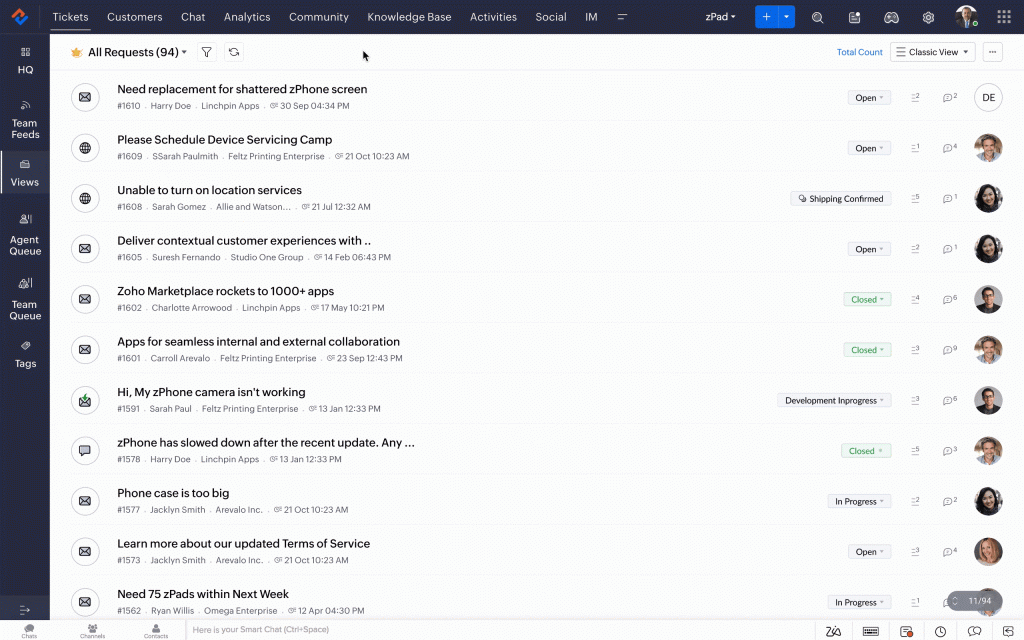
Zoho Desk is a multi-channel help desk solution that transforms chaotic customer inquiries into structured “tickets.” But here is the kicker: it’s built to think.
Traditional lists use a “First-In, First-Out” logic. This is a trap. A password reset for a VIP client shouldn’t sit behind a general “How-to” question from a free-tier user.

Mr.Sceptic
— So, it’s just a fancy list? I can sort my Outlook inbox, why do I need a whole platform for this?
Actually, it’s about context, not just sorting. Zoho Desk uses Agent Collision Detection to ensure two people don’t waste time on the same ticket. It bridges the gap between sales and support through seamless Zoho CRM integration, giving you a 360-degree view of the human behind the ticket.
The Magic of Work Modes: Ending the "Which Ticket Next?" Anxiety
The “Platform Hop” happens when an agent has to check three different screens to decide what to do. Zoho Desk’s Work Modes eliminate this mental fatigue.
By categorizing tickets based on status, time, customer type, and priority, the system makes the decision for you. You don’t “manage” tickets; you solve problems.
1. Handshake Mode: Connecting Sales and Support
This is the most strategic view in the toolkit. It sorts tickets based on the customer’s relationship with your brand.
How it works: It pulls data from your CRM to separate “Leads,” “Potentials,” and “Existing Customers.”
The “Flow”: You instantly know if the person reaching out is a high-value prospect or a loyal customer of 10 years.
The Result: You mold your tone and urgency based on the person, not just the problem
2. Countdown Mode: Racing Against the Clock
In support, time is the only currency that matters. Countdown Mode turns your dashboard into a mission control center.
The Chaos Killer: No more missed SLAs (Service Level Agreements).
The Visual: Tickets feature a live countdown. As the deadline nears, they move up the queue.
The Result: You maintain professional punctuality without constantly checking your watch.
3. Status Mode: Visualizing the Pipeline
If you’re a process-oriented person, this is your home. It organizes tickets by their stage: Open, Pending, or Escalated.
The Flow: Move tickets through the pipeline like a Kanban board.
The Result: You can see exactly where the bottlenecks are. Is “Pending” getting too crowded? You know exactly where to put your energy.
Mr.Sceptic
— Okay, but moving tickets between statuses sounds like more manual work. Does it actually save time?
Actually, you can update statuses or assign agents directly from this view without even opening the ticket. It’s built for speed, not clicks.
4. Priority Mode: Urgent Response, Zero Noise
When the “house is on fire,” you don’t need a list; you need a filter. Priority Mode divides the world into High, Medium, and Low.
The Chaos Killer: Critical system bugs automatically jump to the top.
The Result: Your team stays focused on the fires that matter, while the “nice-to-haves” wait their turn.
5. LIFO Mode: The Classic Approach
For those who prefer the traditional, linear way of working, LIFO (Last-In, First-Out) displays tickets as they arrive. It’s simple, familiar, and effective for low-volume periods.
How to Master Zoho Desk for Maximum Efficiency
Using Zoho Desk isn’t just about looking at screens—it’s about taking action. Here is how you turn these modes into a productivity powerhouse.
Real-Time Dynamic Updates
The queues are alive. If a ticket’s priority changes or its time expires, it moves automatically. You never have to hit “refresh.” You just keep working.
Massive Gains with Mass Actions
Need to assign 50 tickets to a new specialist? Don’t do it one by one. Use the Mass Actions Menu to update, merge, or apply macros to entire groups of tickets at once.
The "Ticket Peek" Secret Weapon
Stop the “Open-Read-Close” cycle. Ticket Peek allows you to preview the entire conversation and customer history without leaving your current view. It’s like having X-ray vision for your inbox.
Conclusion: From Chaos to Clarity
Zoho Desk and its Work Modes shift your team from a defensive “reactive” state to a “proactive” flow. You stop wondering what to do and start doing what matters. It’s about working smarter, not harder.